Understanding DNS Resolution Using dig: From Root to Authoritative Servers
The Domain Name System (DNS) is a foundational component of the internet. Every time a user types a website name into a browser, DNS quietly works in the background to translate that human-readable name into a machine-readable IP address. This article explains why DNS exists, how name resolution works hierarchically, and how the dig command exposes each layer of the DNS system—in a practical, system-design-oriented way.DNS : The Internet’s Phonebook
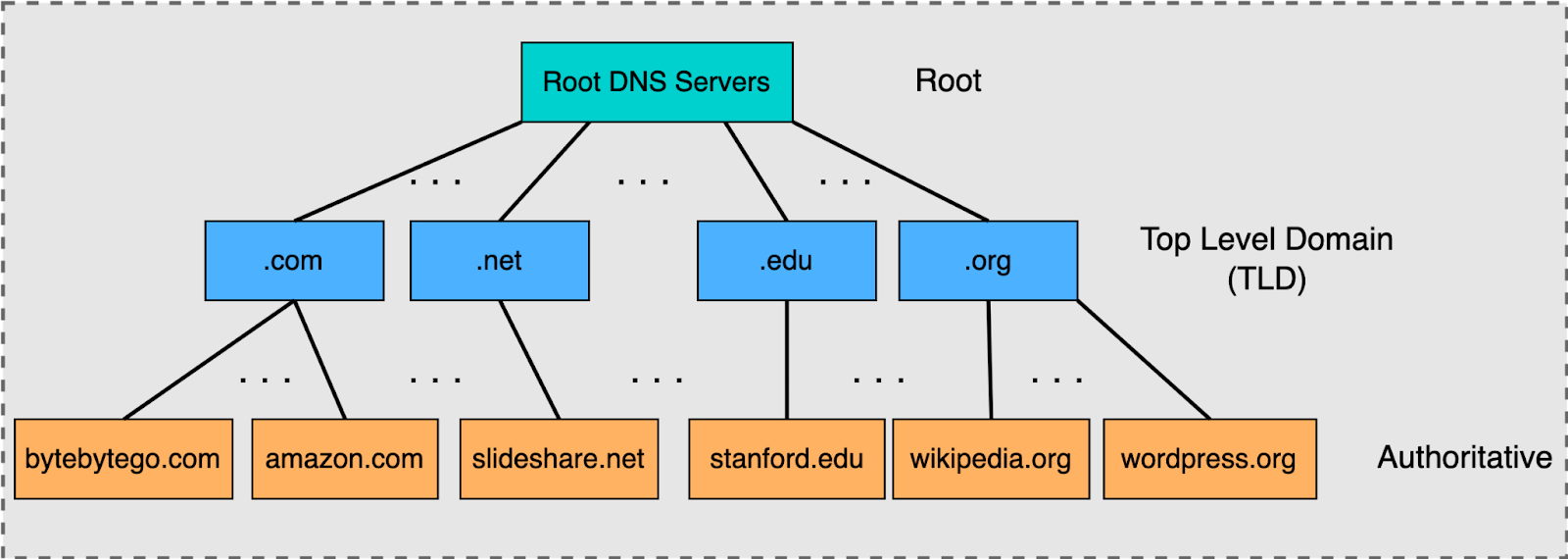
Computers communicate using IP addresses (such as 142.250.182.14), not domain names. DNS exists to map domain names → IP addresses.
However, DNS is not a single database. Instead, it is:
Distributed across thousands of servers
Hierarchical in structure
Highly cached for performance and resilience

This design avoids central bottlenecks and allows the internet to scale to billions of devices and domains.
Introducing dig: Inspecting DNS Internals

dig (Domain Information Groper) is a command-line utility used to:
Query DNS records directly
Inspect which servers respond at each layer and get theirn addresses
Debug DNS configuration and propagation issues
Understand how resolution actually happens
Unlike browsers or operating systems—which hide DNS behind caching and abstraction—dig shows raw DNS responses.
The DNS Hierarchy: Resolution in Layers
DNS resolution happens through a strict hierarchy:
ff
Root Name Servers
↓
Top-Level Domain (TLD) Servers (.com, .org, .in)
↓
Authoritative Name Servers (e.g., google.com)
Each layer only knows where to find the next layer—never the final answer directly (except the authoritative servers).
Querying the Root Zone: dig . NS
» dig . NS
This command asks:
“Who are the name servers for the DNS root?”
What the response shows
A list of root name servers, such as:
Or can show Error
Many DNS resolvers (especially ISP, router, or enterprise DNS servers):
Do not allow direct root (
.) queriesTreat them as unnecessary or suspicious
Private / ISP / Router DNS Resolver
Such resolvers:
Answer normal domain queries (
google.com)Refuse infrastructure-level queries like
dig . NS
Security and Abuse Prevention
Root-level queries can be used for:
- DNS amplification attacks, Reconnaissance, Traffic analysis
As a result, many resolvers:
Allow them internally
Block them for clients
Key characteristics of root servers
They do not store IP addresses for websites .
They only delegate to TLD servers.
They are globally distributed and heavily cached.
DNS governance and coordination is handled by organizations such as ICANN.
Root servers are the starting point for all DNS resolution.
Querying a TLD: dig com NS
» dig com NS
This asks:
“Which name servers manage the
.comdomain?”
What TLD servers do
Maintain delegation information for all
.comdomainsPoint resolvers to the authoritative servers for each registered domain
Do not store A/AAAA records for individual websites
This separation allows millions of domains to exist under a single TLD without overload.
Finding Authoritative Servers: dig google.com NS
» dig google.com NS
This query returns the authoritative name servers for google.com.
Authoritative servers
Are controlled by the domain owner (e.g., Google)
Store final DNS records such as:
A / AAAA (IP addresses)
MX (mail servers)
TXT (verification, security)
CNAME (aliases)
Only authoritative servers can give final, trusted answers for a domain.
Full DNS Resolution: dig google.com
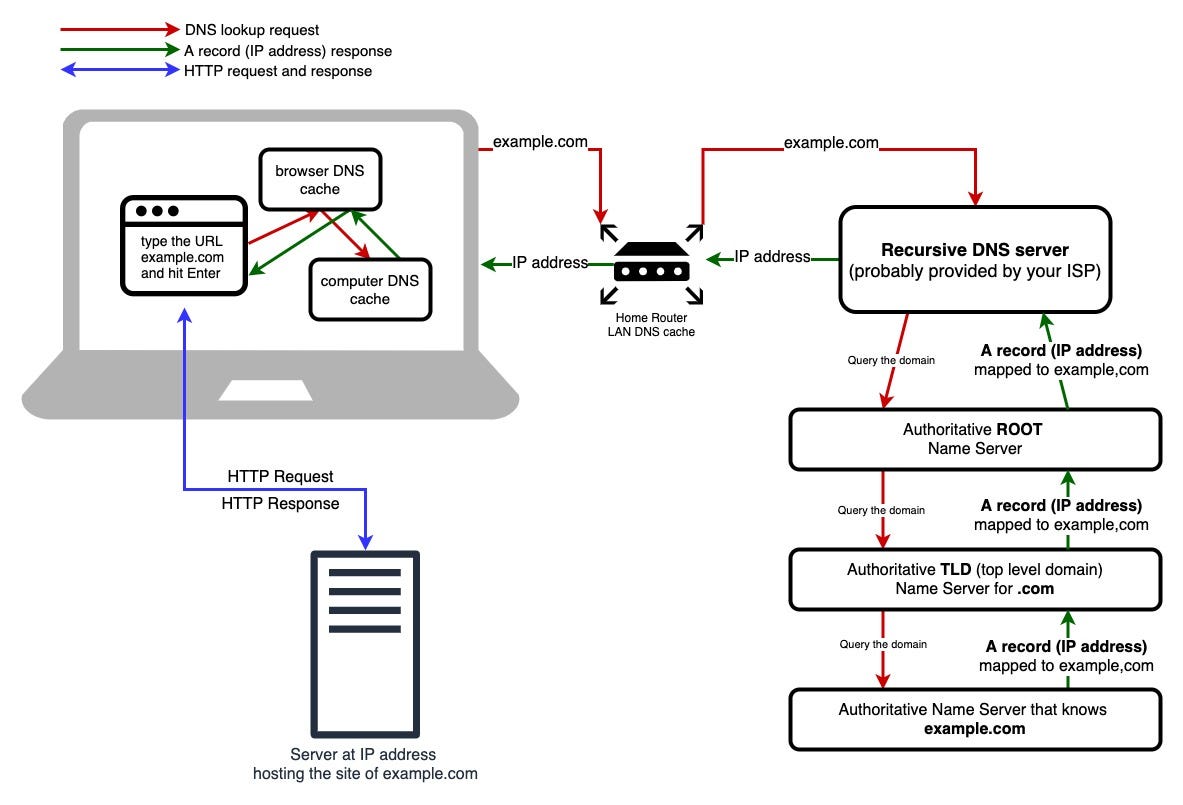
» dig google.com
Although this looks like a single query, the recursive resolver performs multiple steps internally:
Check local and upstream caches
Query a root server for
.comQuery a
.comTLD server forgoogle.comQuery Google’s authoritative server
Return the resolved IP address
The client sees only the final answer, but the resolver walks the hierarchy on its behalf.
Understanding NS Records
NS (Name Server) records answer one critical question:
“Which servers are authoritative for this zone?”
They enable:
Delegation between DNS layers
Domain ownership and registrar changes
Load balancing and redundancy
Failover and disaster recovery
Incorrect NS records can cause complete domain outages—even if all other systems are healthy.
How Browsers Use DNS in Practice
When a user enters a URL in a browser:
DNS resolution occurs first
A TCP connection is established
TLS handshake secures the connection
HTTP request/response begins
DNS is therefore step zero of every web request.
Mapping dig Commands to DNS Layers
| Command | DNS Layer Observed |
dig . NS | Root name servers |
dig com NS | TLD name servers |
dig google.com NS | Authoritative name servers |
dig google.com | Complete resolution flow |
System Design Perspective
DNS succeeds at internet scale because it is:
Hierarchical instead of flat
Decentralized instead of centralized
Cached aggressively
Delegated cleanly using NS records
Tools like dig are invaluable for understanding, debugging, and designing reliable internet-facing systems
THE END …